
BKC · DA COWORKING SPACE
Meeting and Conference Rooms in BKC: A Booking Guide
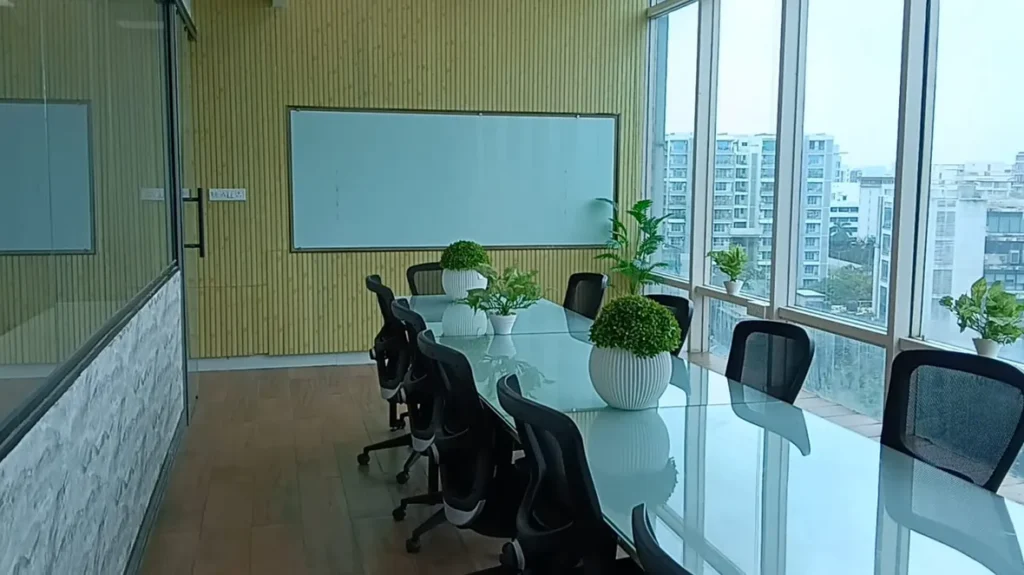
Choose a meeting room in BKC around the purpose of the meeting, the number of participants and the equipment you need. Capacity matters, but so do arrival instructions, presentation setup and enough time to prepare before guests enter.
DA Coworking Space’s BKC booking page lists room options for 6, 8 and 20 people. Check the current room list and availability on the Reserve a Room page; this guide does not reserve a room or guarantee a particular slot.
In this guide
- Match the room to the meeting format
- Choose capacity without creating unnecessary cost
- Confirm presentation and connectivity requirements
- Allow time for arrivals, setup and departure
- Read the booking terms before confirming
- Reserve your BKC meeting room
- Frequently asked questions
Match the room to the meeting format
An interview, an internal review and a client presentation place different demands on a room. Consider whether participants need laptops, printed documents, a presentation screen or space for discussion around a table. Allow for any presenter or remote participant in the headcount.
The advertised seating capacity is a starting point. Ask whether the layout supports your planned activity comfortably and whether the required equipment is available in the specific room you intend to book.
Choose capacity without creating unnecessary cost
Reserve a Room suitable for the confirmed group rather than selecting the largest room automatically. If attendance may change, ask about the options before paying or confirming. A larger room may be useful for an interactive workshop, but it is not always necessary for a short discussion.
| Meeting need | What to discuss before booking |
|---|---|
| Interview or small review | Participant count and privacy |
| Client presentation | Screen, connections and seating layout |
| Team discussion | Table space and room duration |
| Remote participation | Audio, camera and connectivity requirements |
Confirm presentation and connectivity requirements
Send a short equipment list before your meeting. If you use a particular laptop connector, video platform or speaker setup, check compatibility and whether you need to bring an adapter. Test important material before the meeting where possible.
Do not assume that every room includes the same display or video-conferencing system. Confirm equipment, technical assistance and any related charges with the centre. Keep an offline copy of essential presentation files as a practical backup.
Allow time for arrivals, setup and departure
Book enough time for the full activity rather than the agenda alone. Ask when the room becomes available to you and whether setup or overrun time is chargeable. Meetings scheduled back to back may leave little flexibility if a discussion runs late.
Give visitors the correct centre address and the floor confirmed for your booking. DA operates on the 2nd and 9th floors of Pinnacle Corporate Park; the room confirmation should identify where guests need to report.
Read the booking terms before confirming
Review the total price, applicable taxes, cancellation conditions, permitted use and any minimum duration shown in the booking process or quotation. Keep the confirmation accessible to the organiser and confirm the date and time carefully.
Monthly coworking seat pricing is separate from meeting-room pricing. The ₹20,000 BKC workspace rate must not be used as an hourly room rate. If you are an existing workspace client, ask whether your agreement includes any room-use allowance.
Reserve your BKC meeting room
Open the booking page, choose the relevant room, date and available time, then complete the requested details. Treat the reservation as confirmed only when the booking system or centre provides confirmation. If your requirements are unusual, contact the team before committing.
For group visits or a workspace enquiry alongside the meeting, use the BKC enquiry form. Share the meeting purpose, attendee count and equipment needs so the centre can advise on an appropriate arrangement.
Frequently asked questions
What room sizes are listed for BKC?
The booking page lists BKC options for 6, 8 and 20 people. Check the current room list and availability before planning around a specific room.
Can I book online?
Use the Reserve a Room page to check the booking options. A reservation depends on available slots and confirmation.
Is presentation equipment guaranteed?
No. Confirm the equipment and compatibility in your chosen room before the meeting.
Are meeting rooms included with a workstation?
Any allowance depends on the workspace agreement. Check inclusions and additional charges with the team.
Where should meeting guests go?
Use the floor and arrival instructions in your booking confirmation for Pinnacle Corporate Park, next to Trade Centre BKC.
Related BKC workspace guides
- BKC Office Visit Checklist: What to Inspect Before Booking
- Private Office Space in BKC: What to Check Before You Choose
- Coworking Space Cost in BKC: A Practical Budget Guide
Discuss your BKC workspace requirements
Visit DA Coworking Space at Pinnacle Corporate Park, next to Trade Centre BKC, MMRDA Area, Bandra Kurla Complex, Mumbai, Maharashtra 400051. Tell us your seat count, preferred start date and meeting requirements so we can discuss current availability.
Explore the BKC centre · Request pricing and availability · Open our Google listing
Call / WhatsApp: +91 9769309518 · Message our team · office@dabusinesscentre.com
Published by DA Coworking Space. This is a company-authored guide, not an independent ranking. Workspace availability, facilities, prices and commercial terms should be confirmed with the centre before booking.